

How to Design VLAN Segmentation in UniFi Without Breaking Printers and IoT
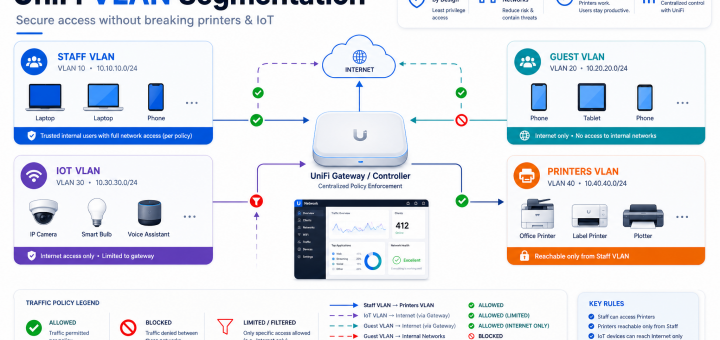
How to Design VLAN Segmentation in UniFi Without Breaking Printers and IoT
This is day 2 of our 14-day publishing sequence focused on practical Software Defined Networking operations for SMB teams.
Why this topic matters
Most outages and user complaints in small and midsize environments are caused by operational drift, not missing features. The goal is to run a stable, predictable network that supports business systems first, then optimize for performance.
Practical checklist
- Baseline first: document controller version, gateway firmware, AP/switch status, and known incidents.
- Define success criteria: latency, packet loss, retry rates, VPN reconnect time, and business app behavior.
- Pilot one site: apply changes in a controlled location before broad rollout.
- Validate core workflows: POS, VoIP, VPN, guest access, and camera/IoT continuity.
- Observe for 24 hours: only expand after stability is proven.
UniFi-focused guidance
For UniFi admins, keep release discipline: backup before changes, limit change scope per window, and track post-change metrics against baseline. If metrics degrade, roll back quickly and document root cause.
Multi-vendor perspective
While UniFi is our primary focus, we occasionally compare Omada, MikroTik, Aruba Instant On, and Cisco SMB. The right choice depends on operational overhead, support model, and consistency in real-world deployments.
Takeaway
Strong network operations come from repeatable process. Standardize checks, execute changes deliberately, and prioritize business uptime over chasing every new feature.
Keywords: UniFi, VLAN design, IoT segmentation, SMB network
Recent Comments